Showing posts with label Videolink. Show all posts

Saturday, June 5, 2021

WORLDS FASTEST USB RF Spectrum Analyzer - Aaronia Spectran V6 RSA500x

Aaronia Spectran V6 RSA500x RF analyzer:

  • extremly low POI (probability of intercept, how short of an RF signal spike can the device "see") 97ns (FFT-based) 10ns (I/Q-based)
  • fast sweep speed: over 500GHz/s, it can sweep 6 GHz in less than 10ms
  • RTBW (realtime bandwidth) 120MHz! (can be unlocked to 245MHz)
  • Range: 10 MHz to 6 GHz
  • Dimensions: 210 x 115 x 30 mm, 860gr weight
  • powerbank in same formfactor with 26Ah
  • for mobile use: powerfull laptop! (or reduced fps) larger Powerbank (needs to supply enough WATTS!) or only 120MHz scan rate with one USB 3.2g2
●▬▬▬LINKS▬&▬INFOS▬▬▬▬▬▬▬▬▬▬● PRODUCT Link: https://bit.ly/2T14qM4 my ►DOWNLOADS: https://bit.ly/3uRn5rc (Profiles, custom Missions, Links) https://aaronia.de/downloads/ https://aaronia.de/grundlagen/oesterreich-gsm-umts/ great FPV Frequncy overview from Michael Niggel PROFILES: Find (and backup) the Frequency profiles here: C:\Program Files\Aaronia AG\Aaronia RTSA-Suite PRO\cdata\profiles and move the profiles I supply ( https://bit.ly/3uRn5rc ) into there. Profiles are loaded on program start (if you change something in these XML files, restart the program! They are sometimes "connected" or nested together. If the parent is missing you wont see a child profile! Profile "Labels" are only visible below a spectrum if in spectrum settings the option "accept profiles" is active! It's better to choose the profiles in "Config" of Spectrum rather than with the Ribbon button... BASIC RF spectrum knowledge:
  • RBW (bandwidth - how accurate do I look at RF?) lower is better (more accurate) but slower sweep
  • VBW (video filter - low (100khz) filters MUCH, FULL settings means highest detail!) higher is better (less smoothing) but you see more noise (set to low if you only wanna see powerfull signals clean)

Thursday, November 28, 2019

DJI FPV HD System (draft)

I'm preparing the DJI FPV systems review (my current project, lot's of fun, very interesting!).
You can already see my own notes and get a ton of info from it - or you wait until my video is finished and consume it with some popcorn...
The txt file above is a work in progress...

Antennas  - for example - look like this:


First video: Latency test - see what I found while measuring it on the oscilloscope:

Thursday, November 2, 2017

FPV in the woods with digital transmission (FPV Blue, RC Car)


This is the followup to my hangar review of the FPV.Blue HD video transmission system. First flew with a quad, later moved on to an RC Car to test penetration of RC signal in the dense woods. What a fun! Finally driving around from inside my hangar...

●▬▬VIDEO INDEX:▬▬▬▬▬▬▬▬▬▬▬▬●
00:31 testflight with TBS Disco and FPV.Blue
01:52 swap gear to RC CAR (short overview)
02:28 FPV in the WOODS with RC Car
02:24  some directly recorded FOOTAGE
06:03 filmed from screen from here on
06:41 the gravel road, distance, passers, dogs,...
07:24 MAP of first distance test (~150m)
07:54 DOG :)
08:46 second distance test IN THE WOODS
09:21 to the flightfield!
10:04 WDR fail in bad light conditions...
10:45 WOODS overview
11:49 BETTER Screen recordings (sharp) from HANGAR
13:08 Chihuahua chased :)
13:39 father in law chased :)  ("roadkill")
14:49 lowlight example with WDR on - noisy

●▬▬LINKS/INFOs▬▬▬▬▬▬▬▬▬▬▬▬●
Thread on RCG: https://www.rcgroups.com/forums/showthread.php?2703512-fpv-blue-720p-HD-FPV-50-ms-latency-7km-range/page24


►EQUIPMENT: http://goo.gl/QNzck
Filmed with:  Panasonic GX8 + R0de VideoMicro, Samsung Galaxy S7, Yi 4k
Thanks PETER for filming ext shots, thanks CHARLIE for letting me chase him  (the Chihuahua) and thanks to my lovely guide in the woods!

►♫MUSIC:
Brand New Beginning - Gavin Luke
Fifteen - Aldenmark Niklasson
Compliments To The Piccolo 1 - Peter Sandberg

Tuesday, October 24, 2017

Digital HD video downlink! (Interview with FPV Blue, long range low latency)


We're waiting for some serious HD video transmission now for a few years. Connex prosight was promising and is still the most used? - ok Lightbridge and Occusync from DJI are market leader - but they have very high latency...
For "real" FPV usage we need lower latency, reliability, range. All being promised by a small, dedicated company - FPV.Blue.

Join me in the hangar for a closer look at this new system, check out the menu options, see the latency measured, and see me interviewing Davide from FPV.Blue.

!DISCLAIMER! - FPV.Blue sent me this product for review, you can buy it here
●▬▬VIDEO INDEX▬▬▬▬▬▬▬▬▬▬▬▬●
00:00 FPV Blue - system overview
01:30 Receiver (diversity)
03:04 CLOSEUPs
03:32 SD Card recording?
04:55 Transmitter
06:02 HD Cam
06:52 Transmitter closeup
07:19 Antennas
08:08 Spectrum Analyzer
08:34 MENU OPTIONS-----------
08:50 - Video input
09:44 - Modulation (transmission settings)
11:19 - Display settings (Bluesync)
12:30 OSD
13:50 LATENCY (Eachine Goggles 2, Black Pearl, DJI Goggles
15:32 INTERVIEW with Davide from FPV.Blue
16:01 - background, company...
16:37 - shipping times
18:03 - Antennas
18:19 - Goggles tested...
18:47 - 2.4Ghz and 5.8Ghz Versions?
20:15 my conclusion
21:16 some short footage clips (more in next video)

●▬▬LINKS/INFOs▬▬▬▬▬▬▬▬▬▬▬▬●
Thread on RCG: https://www.rcgroups.com/forums/showthread.php?2703512-fpv-blue-720p-HD-FPV-50-ms-latency-7km-range/page24
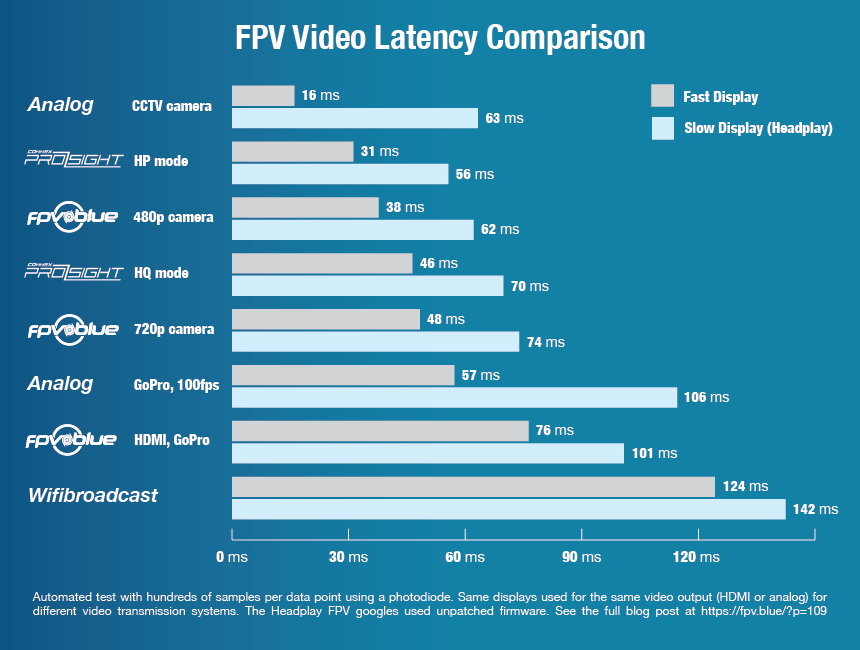
FPV Latency compared to other systems: https://fpv.blue/wp-content/uploads/2016/09/latencyComparisonV1.png

Antenna recommendation: https://goo.gl/7H93iu
why CP antennas are not neccessary: https://goo.gl/Lh4Hmn

Groundstation Recordings (a bit troublesome to work with as of 16.Oct.2017 - should be improved with next firmware):
can be played back with MPLAYER  
there's also a GUI version (SMPLAYER)
Recordings do not get corrupt when power is lost

Bonafidepirate: 14km flight
first video, thoughts
●▬▬▬▬▬▬▬▬▬▬▬▬▬▬▬▬▬▬▬▬●

Tuesday, July 11, 2017

Foxeer Legend3 TVOUT and Latency compared to Runcam2 and 3

You wanted to know how the legend 3 looks if used as FPV cam (tv out). I installed it on my new FPV plane (MiniTalon) but before this I tested the latency against Runcam2 and 3.
While the latency of the Legend3 isnt legendary, the imagequality IS! The stabilizer didnt work great for me - better leave it turned off if you use the liveout.
DONT use the cam WITHOUT battery (if you power it from your plane). While this will save some weight, it can lead to disaster!

Jump into the area of interest for you with these jumpmarks (clickable on youtube!):
===========
00:16 Legend3 Latency PAL
01:19 L3 in NTSC faster!
02:12 L3 stabilization - more lag?
03:10 L3 with 4k mode
04:33 L3 Liveout quality

06:02 Runcam2 Lantecy
06:47 Runcam3 Latency
07:18 Legend3 - final thoughts
08:29 IMPORTANT - USE the BATTERY even with external power!
09:24 RECOVER MOVIE?

10:58 L3 Stabilization ON 1080p50
11:15 L3 Stabilization OFF 2.5k50
11:32 L3 Stabilization OFF 2.5k50 VEGAS software stabilization on

Monday, July 3, 2017

Runcam Eagle 2: great picture, latency lower! thoughts, testflights, DVR footage


I took a closer look at the claimed better latency here. Check my new method - I like how it visualizes the time-delay...
The cam is really good. Image is one of the best currently available, only the missing OSD Volt option is a small downside.
At the end you'll find a comparison with different cams - check my VIDEO INDEX:
===========
02:12 latency Eagle2
04:14 Eagle1 compared (how much fast is Eagle2?)
07:34 Swift Mini Latency
09:05 SUMMIT (about Eagle2)
09:46 Runcam Split Latency, Split thoughts
11:53 Eagle 2 Downsides no OSD
12:33 Eagle 2 positive: very nice imagequality!
12:49 more FLIGHT FOOTAGE
14:25 even MORE FOOTAGE ( MINI Swift, HS1177, EAGLE1 and 2, Foxeer MONSTER V2
16:22 Runcam SPLIT DVR Footage (some of you asked!)

LINKS:
=====
FPV Cam comparisong (Xlsx sheet)
LATENCY method
the Runcam SPLIT Reveiw
Runcam MICRO SWIFT

Thursday, June 22, 2017

Runcam SPLIT: FLIGHT Footage, Jello, Mounts, weight savings!

Tech Specs: (similar to the Runcam3!)
Weight 23g.
1080p60 + Low latency FPV + WDR
$69.99  (+5$ for Wifi option)
no wide voltage, only 5V!


More findings:
Transfer speed over USB: ~ 15mb/sek
so a typical 5min flight will generate little over 1GB means ~ 1.5mins.
Not optimal - ok if you have to place the board inside inaccessible (USB needs to be accessible of course!)

Jello: with that small lens module jello (vibration "waves" in the video) will be picked up easier since the low mass is moved by vibrations easier as if you would have a bigger mass (like a heavy HD cam).
I tried different mounts, only after I swapped that one really bad prop it was ok. I didnt see this vibrations with that faulty prop on my gopro style SJCam 5000x before!

Downlink video is fine to fly - latency low enough for my taste!

My Vortex 250 is now 83gr lighter (from 532 to 449gr) - this is a lot on such a copter and effects it's flight characteristics and efficiency! It's really "floaty" now and should give me longer flighttimes. Combined with endurance motors/props and larger motorarms this could be a really good longrange setup!

Friday, June 16, 2017

Most accurate FPV cam latency test method? and: eliminate interference in your downlink video

2020 UPDATE: "current" Latency XLS Sheet


My most accurate FPV Cam latency test setup:

2 channels (curves on osci):
ch A = video signal (NTSC)
ch B = 12v powersource for my LEDs   (I think I dont measure the actual switch on, but rather the time when it "consumes" the 12v. Would be interesting to know how much time does it take the LED to light up?)

Measure the delay from LED switch and the "effect" from a dark cam image to a RED LED light screen (noticable effect on the video curve).
This way we still have the 17ms steps of time resolution since we only see 60fps on NTSC. So we cant measure cam latency more accurate than in 17, 34, 51ms...
BUT: until now I used a LCD screen to read the VIDEO signal changes (and the screen also runs a certain FPS - so this is not accurate anymore - better to "read" the video signal directly without a LCD).

FPV Cams Latency overview:  (June-2017)     (also available as XLSx File)


Interesting Links:

Sunday, May 21, 2017

Antennas tested in flight: Pagoda vs Aomway SPW, TBS Triumph and "normal" linear


Video index:
==========
01:31 std. antenna (linear)
03:16 std. ant. multipathing test
03:56 AOMWay SPW
06:22 AomWay multipathing
07:09 TBS Triumph
09:01 Triumph multipathing
10:02 PAGODA
11:47 Pagoda multipathing
12:49 Range test with 30db ATTENUATOR
13:41 Atti and Std. Antenna
14:39 switch to AOMWay
16:05 switch to TBS Triumph
17:14 switch to Pagoda
19:14 Atti+std.Antenna and 2xPagoda on Goggles VRX
21:15 CONCLUSION
24:20 -- 4 antennas DIRECT COMPARISON footag!!! --

Multipathing:
When the video transmitter (the copter here) emits the RF signal - it goes straight to your receiver (line of sight!) and also gets reflected off some obstacles (like the big building here).
The reflections do arrive at the receiver slightly later (longer way) so the RF waves (direct and reflected ones) will either "add up" or "null out" each other. Interference occurs and distorts your video image.

Circular polarization helps here, because the reflected signal will be "filtered away" almost completely.

Friday, April 21, 2017

Runcam Micro Swift


Swift Micro CCD   get it -> here
Dimensions: 19x19x19mm!
Latency: ~ 25ms
Resolution: 600 Tvl
Weight: 7gr
Lens of course is NOT compatible with lenses from the "normal" FPV cams out there - it's much smaller!

Monday, April 10, 2017

Fatshark Diversity Module Quanum HB5808 (50$) vs FR632 Groundstation


I got this from Hobbyking (get it here) for testing. Found it interesting and my standard 5.8 module was not reliable, neither was the upgraded FSV2445 antenna diversity module...

It was some "sweat"work on the goggles and I dont have nice covers/doors yet - but the functionality is just awesome. I can fly WITHOUT my FR632 tower now and have good video downlink! Makes quick FPV sessions much easier!

Check out Bardwells videos on the different modules to see if the Furious TruD or the LaForge is better for you. The conclusion I found: LaForge seems to be the best (from features and usability) but the RF performance is pretty similar on all of those.
Pricerange is from 50 - 120$

There's also a single-slot module at similar price if you prefer
Looks like it uses the same RF hardware, also looks similar to the RealACC that Joshua reviewed: https://youtu.be/TkBVJU8n2Fk&t

▼Music▼
Billyrocka 3 - Sven Karlsson
Kevin McLeod - Darxieland

Thursday, March 16, 2017

Runcam Swift2, Foxeer HS1190 and more FPV cams compared (accurate latency measurements!)

See my new, ACCURATE, latency measurements here (thanks Daemon42). Now we're down to +-5ms accuracy! Those cams are pretty impressive. Runcam Eagle had good reviews already, Swift2 and HS1190 are good as well. I also compared the Owl+ and the AMOWay. Image looks good on most cams if DWDR options is turned on.


►Cams tested:
Foxeer HS1190
Runcam: Swift1, Swift2, Eagle(16:9), Owl+
Aomway WDR 700 (Cmos)

LATENCY [ms]: (LED test, accuracy +-5ms)
19 Owl+
20 hs1190
24 Swift2
24 AOMWay
30 Swift1
47 Eagle (processing comes with a lag penalty...)

►TIP: additional OSD: (volts, Nickname, Timer):
Press and hold the button UP for 2 seconds to enter OSD Setting menu

►Settings: leave most settings on default - BUT ENABLE
the DWDR setting! It's like "turning on the light" - AWESOME!

Wednesday, February 15, 2017

FPV Goggles Overview

Banggood supplied the Eachine goggles and short after Hobbyking sent me the new Cyclops v2. It was a good chance to compare these and also make an overview of FPV goggles for you guys (there will be a part2 soon with "normal" FPV goggles like fatsharks).

Videoindex: (use it to jump to interesting parts)
01:00 Eachine Goggles two
01:08 RP-SMA antennaconnectors
01:57 AV out
02:20 Box contents
02:35 Quanum Cyclops v2
02:53 single VRX
02:59 old Cyclops only autoscan...
03:32 battery pouch, SMA
04:15 AUTOSCANS works great
04:27 more buttons (finally!)
05:10 wearing comfort?
05:58 fresnel lens (adjustment effect?)
06:05 Box contents
06:56 IMAGE tests
07:18 cyclops v2 menu
07:44 effect of fresnel adjustment (none?)
08:03 Cyclops v1 (weird colors)
08:25 Eachine quality (nosepart fail)
09:36 sharpness? (HDMI supersharp, analog not so)
10:01 Eachine autoscan fail (5mhz off)
10:22 menu
11:08 DIRECT comparison Cyclops v2 vs Eachine G2
11:28 findings / summit Cyclops v2
12:02 findings / summit Eachine
13:25 LIVETEST: flying miniquad with new goggles - will I crash?
14:03 YES :)
14:19 livetest of Cyclops
15:03 final thoughts


2nd Video with the different Fatshark models I've used before:

Sunday, July 3, 2016

Runcam Owl Plus Review (compared to HS1177, night vision comparison - how dark?)

Runcam sent me their top cam - let's see if you can fly in total darkness with it! I compare the Owl against the popular HS1177 with a nice dual monitor setup.

►RunCam Owl Plus Specs:
1/2″ image sensor
700TVL horizontal resolution;
150 degree FOV lens (2.4 mm)
5V to 22V (suitable for 2s – 5s LI-POs)
light senility, 0.0001 Lux/1.2F min. illumination
Digital Wide Dynamic Range (D-WDR)
Digital Noise Reduction (2DNR)
Automatic gain control (AGC)
Back light compensation (BLC)
OSD menu
26 mm x 26 mm x 30 mm, 15 g net weight.

►Thoughts:
The OSD is pretty straight forward, just activated the DWDR and played with colors and contrast a bit.
Not as good with shadowd vs. sunlight on the day, but awesome in the night. Although you shouldnt expect to fly a miniquad in acro mode without "some" light in the night.
If you use it on a GPS stabilized quad or plane you could really almost fly in pitch black nights.
If you wanna explore darker buildings you will be surprised how long you get coloured images until it finally switches to BW mode.

I will have to do a few flights, but I think you can definitly use it as a standard cam and also fly in daylight if you are not too picky. And it is definitly better than those cheaper CMOS cams (like the one that came with my Vortex250).

Wednesday, March 16, 2016

Vortex 250 Cams (Cmos vs CCD), VTX Power and Graphene Batteries

Here you will see how to swap the stock CMOS FPV cam, true Video Transmitter output power and battery considerations.


►Stock FPV Cam (Fatshark vs. AOMWay vs. HS1177m)
Not totally happy with the video image on my goggles - on hard light conditions (flying in shadow, near ground and have well lit parts will end in overexposed parts where you see NOTHING!

►Video TX mw power at different CH
I also did some measurements with the IRC RF Powermeter. No idea how exact the readings are. I learned that the VTX is heating up and the heat affects the MW power output. So all thoes measurements are from the 2nd series (I had it running there on the bench for 20-30 mins for sure. The base of the copter got pretty warm - hope the VTX survived this :)
I'm quite sure that those 40ch TX have a sweet spot around some specific frequencies and deliver more output there.
All measured at HIGH (not low or auto).

Test-Setup:
OSD FW: 1.0.0.25    FC FW: 2.1.6 BTFL (Stock)
Measured with ImmersionRC RF Powermeter
30db Attenuator and direct connection

IRC Band - ch with mw:
1: 352 | 2: 327 | 3: 306 | 4: 288
5: 279 | 6: 270 | 7: 262 | 8: 246

Raceband:
1: 469 | 2: 421 | 3: 406 | 4: 365
5: 327 | 6: 300 | 7: 270 | 8: 215

Boscam E:
1: 378 | 2: 406 | 3: 437 | 4: 453
5: 230 | 6: 225 | 7: 198 | 8: 164

Boscam B:
1: 392 | 2: 365 | 3: 327 | 4: 316
5: 297 | 6: 288 | 7: 279 | 8: 262

Boscam A:
1: 279 | 2: 297 | 3: 306 | 4: 327
5: 339 | 6: 352 | 7: 378 | 8: 392


►Links to the products:
Aomway CMOS 700TVL Camera (PAL) for FPV   
Fatshark CMOS 700tvl
Surveilzone CCD "Minicam" HS1177m
Battery: Turnigy Graphene 1800mah 4cell, 65c, 240gr
I will tell you my flight experience with these in a follow up video!

Wednesday, September 30, 2015

Easy Antenna tracker - review and fieldtesting (ImmersionRC ezAntennatracker V2)

Immersion sent me their ezAntennatracker V2 some time ago. First I was sceptic if I want to use it, since tracker setup sounded way to complicated for me when I saw it in use by other FPVers.
But since they have "ez" (for easy) in many of their products I thought I'll give it a try.
I opted to use only the PAN-Servo - TILT is only needed if you fly really high or if you have a very directional antenna. I use the 13dbi Spironet with 35° horiz and vertical beamwidth - so I dont need to TILT with the tracker.
This makes the mechanics way easier - just a big "plate" directly on the huge sailwinch servo where I placed the antenna.
To get this on my tripod I just taped all together (doublesided tape) - the ezTracker with DiversityRX and servo.
Of course the diversity here is overkill - if using a tracker you shouldnt need a diversityRX.

Summary:
If you have a copter or plane with ezOSD onboard - this tracker is really nice and easy to use. It gives you 360° of really good video signal quality!
The fact that you have to have telemetry however is a showstopper for me on many FPV vehicles (I have many quads and planes and only few of them have telemetry).

For me: I packed the diversity and the tracker on one groundstation and I can switch between: tracker operation - or just diversity.
Recently I made this quite modular with some gopro mounts (i can plug in antenna and monitor additionally if I want to).

In a next video I will try to compare the use of a tracker to my normal use of diversity RX with different antennas - most noteably the new Pepperbox high gain, high beamwidth antenna!


►Info
Tracker: http://www.immersionrc.com/fpv-products/ezantennatracker-v2/
Pan-Servo: HS-785 HB Sailwinch Servo
Antenna: Spironet Patch 13dbi
you also need some SMA Antenna Extension cables!

►Startup (5mins!):
- set home (FPV vehicle with enough SAT acquired and with ezOSD telemetry running! standing next to the groundstation
- BEARING Calibration:
I found this to be the easiest way. You just move the copter away in one direction (20 or 30ft) and make sure the antenna is pointing in the right direction - if not - adjust.

►Requirements to get this tracker running:
Quite simple - you just need their ezOSD (or maybe some other compatible telemetry downlink?). the OSD sends GPS position and other telemetry info encoded in the audiochannel of your normal FPV downlink (one audio channel).